hyper-v on windows 10 home

Create hv.bat and run as administrator (restart pc after)

 pushd "%~dp0"
 dir /b %SystemRoot%\servicing\Packages\*Hyper-V*.mum >hv.txt
 for /f %%i in ('findstr /i . hv.txt 2^>nul') do dism /online /norestart /add-package:"%SystemRoot%\servicing\Packages\%%i"
 del hv.txt
 Dism /online /enable-feature /featurename:Microsoft-Hyper-V -All /LimitAccess /ALL
 pause
 

https://docs.microsoft.com/en-us/answers/questions/29175/installation-of-hyper-v-on-windows-10-home.html

php-for-windows

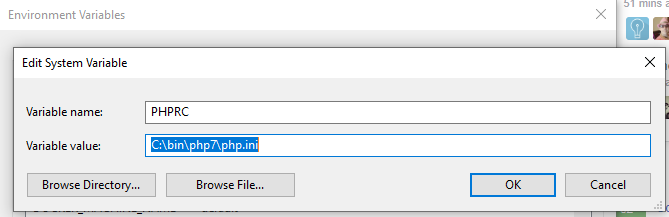
  1. setx PHPRC "C:\YourPathto\PHP7\php.ini"
    You should seeĀ SUCCESS: Specified value was saved.
  2. Then restart your computer (really).
  3. Or edit environmental variables through the regular way, then restart:


  1. cmd -> env
  2. PATH
  3. C:/YourPathto/PHP7 & C:/YourPathto/PHP7/ext


The PHPRC (PHP Runtime Configuration) environment variable is one way to tell PHP where to find the main php.ini file. It can sometimes be used to change the location of the main php.ini file.
Reference: http://php.net/configuration.file

https://webmasters.stackexchange.com/questions/102131/what-does-setenv-phprc-do-and-how-is-it-used

get wifi-password

1. Network & Internet settings -> Status -> Network and Sharing Center
2. Wi-Fi (YOUR-NAME) -> Wirelless Properties -> Security -> Show Characters