https://www.linuxtuto.com/how-to-install-php-8-3-on-ubuntu-22-04/
php8.1-fpm + http2
https://www.cloudbooklet.com/developer/how-to-install-php-fpm-with-apache-on-ubuntu-22-04/

apt install php8.1-fpm

a2dismod php8.1
a2dismod mpm_prefork
a2enmod mpm_event proxy_fcgi setenvif
a2enconf php8.1-fpm
a2enmod http2

systemctl restart apache2
service php8.1-fpm restart
install php8.1
install php8.1
https://computingforgeeks.com/how-to-install-php-on-ubuntu-linux-system/
install php8.1-fpm + apache
https://www.cloudbooklet.com/how-to-install-php-fpm-with-apache-on-ubuntu-20-04/
how many workers are currently running
If you just want to know how many workers are currently running, you can try with HTOP, do a htop and filter (F4) with “php-fpm”.
Or with ps
ps aux | grep "php-fpm: pool"

https://serverfault.com/questions/878096/how-to-check-current-pm-max-children-setting
switch php version
Apache:
$ sudo a2dismod php5.6
$ sudo a2enmod php7.1
$ sudo service apache2 restart
Command Line:
$ sudo update-alternatives --set php /usr/bin/php7.1
$ sudo update-alternatives --set phar /usr/bin/phar7.1
$ sudo update-alternatives --set phar.phar /usr/bin/phar.phar7.1php-for-windows
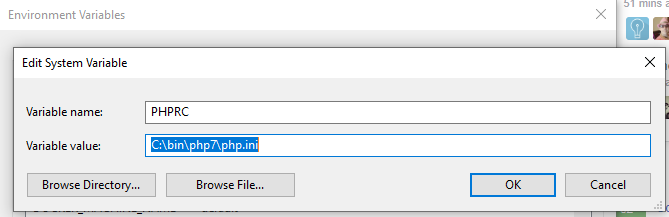
setx PHPRC "C:\YourPathto\PHP7\php.ini"
You should seeSUCCESS: Specified value was saved.- Then restart your computer (really).
- Or edit environmental variables through the regular way, then restart:
- cmd -> env
- PATH
C:/YourPathto/PHP7&C:/YourPathto/PHP7/ext
The PHPRC (PHP Runtime Configuration) environment variable is one way to tell PHP where to find the main php.ini file. It can sometimes be used to change the location of the main php.ini file.
Reference: http://php.net/configuration.file
https://webmasters.stackexchange.com/questions/102131/what-does-setenv-phprc-do-and-how-is-it-used
local ssl certificate
- Similar for other environment
- download and extract for cacert.pem here (a clean file format/data)
- Put it here in the following directory.
C:\xampp\php\extras\ssl\cacert.pem
- In your php.ini put this line in this section (“c:\xampp\php\php.ini”):
;;;;;;;;;;;;;;;;;;;;
; php.ini Options  ;
;;;;;;;;;;;;;;;;;;;;

curl.cainfo = "C:\wamp\bin\php\extras\ssl\cacert.pem"
- Restart your webserver/apache
- Problem solved!
install php7.4
isbandytas:
https://www.cloudbooklet.com/upgrade-php-version-to-php-7-4-on-ubuntu/

nebandytas, turi papildomu moduliu ir mysql+phpmyadmin
https://www.bennetrichter.de/en/tutorials/apache2-php7-mysql-phpmyadmin/
install php7.3
https://websiteforstudents.com/install-php-7-3-php-7-3-fpm-with-apache2-nginx-on-ubuntu-16-04-18-04-18-10/
php version
what PHP version your Apache server is using,
the output of phpinfo() is always what you should pay attention to
sudo a2dismod php7.1
sudo a2enmod php7.3
sudo service apache2 restart
Install Composer
https://www.ionos.com/community/hosting/php/install-and-use-php-composer-on-ubuntu-1604/

windows 10
https://devanswers.co/install-composer-php-windows-10/