GET
composer config --global process-timeout
SET
composer config --global process-timeout 600
php-for-windows
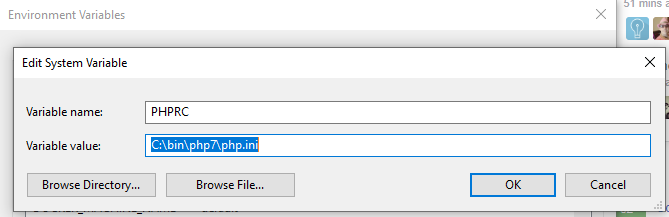
setx PHPRC "C:\YourPathto\PHP7\php.ini"
You should seeSUCCESS: Specified value was saved.- Then restart your computer (really).
- Or edit environmental variables through the regular way, then restart:
- cmd -> env
- PATH
C:/YourPathto/PHP7&C:/YourPathto/PHP7/ext
The PHPRC (PHP Runtime Configuration) environment variable is one way to tell PHP where to find the main php.ini file. It can sometimes be used to change the location of the main php.ini file.
Reference: http://php.net/configuration.file
https://webmasters.stackexchange.com/questions/102131/what-does-setenv-phprc-do-and-how-is-it-used
bash update file
#! /bin/sh
file=xyz.cfg
addr=$1
port=$2
username=$3
sed -i 's/address=.*/address='$addr'/' $file
sed -i 's/port=.*/port='$port'/' $file
sed -i 's/username=.*/username='$username'/' $file

https://stackoverflow.com/questions/14643531/changing-contents-of-a-file-through-shell-script/28559815Config::set
Config::set(‘database.connections.mysql.database’, ‘db_name’);
dynamic imports with laravel mix
ignore ext
composer.json:

"config": {
  "platform": {
    "ext-pcntl": "7.1",
    "ext-posix": "7.1"
  }
}
local ssl certificate
- Similar for other environment
- download and extract for cacert.pem here (a clean file format/data)
- Put it here in the following directory.
C:\xampp\php\extras\ssl\cacert.pem
- In your php.ini put this line in this section (“c:\xampp\php\php.ini”):
;;;;;;;;;;;;;;;;;;;;
; php.ini Options  ;
;;;;;;;;;;;;;;;;;;;;

curl.cainfo = "C:\wamp\bin\php\extras\ssl\cacert.pem"
- Restart your webserver/apache
- Problem solved!
search
site:sitename.lt
site:.lt
-excludename
"konkreti fraze"

https://www.linkedin.com/pulse/15-google-gudrybi%C5%B3-justinas-mikulskis-/
android studio – Minimize the impact of antivirus software on build speed
exclude certain directories from real-time scanning
- Gradle cache:
%USERPROFILE%\.gradleAndroid Studio - projects:
%USERPROFILE%\AndroidStudioProjectsAndroid - SDK:
%USERPROFILE%\AppData\Local\Android\SDK OR C:\Android\android-sdk - Android Studio system files:
%USERPROFILE%\.AndroidStudio<version>\system
https://developer.android.com/studio/intro/studio-config?utm_source=android-studio#antivirus-impact
enable developer tools
- Settings -> About Phone -> (Software information)
- Tap 7 or 8 times on Build number or Version number
- Go back to Settings and enter
- Developer Tools -> Turn on
- Developer Tools -> USB turn on